
Overview

The Oracle LogMiner Source is an SSIS Data Flow component that reads committed INSERT, UPDATE, and DELETE operations from Oracle redo/archived logs using LogMiner. It processes a specified SCN range, locates and adds the required log files to a LogMiner session, queries the LogMiner contents view, parses the SQL redo statements, and outputs the detected data changes for downstream processing.
The component exposes three outputs, corresponding to Insert, Update, and Delete operations. Each output contains all columns from the target table, and an additional SQL_REDO column that holds the raw SQL statement for the operation.
The start SCN is read from an SSIS variable at the beginning of execution, and when processing finishes, the end SCN is written back to the same variable, allowing subsequent executions to continue from the last processed position.
Database Prerequisites
To use the Oracle LogMiner Source, the database must be configured to generate the required redo information for LogMiner. The following settings must be enabled:
ARCHIVELOG mode – required so redo logs are archived and can be mined by LogMiner.
Supplemental logging – required so LogMiner can reconstruct complete row changes for DML operations.
These settings can be enabled with the following commands (must be executed by a DBA):
ALTER DATABASE ARCHIVELOG;
ALTER DATABASE ADD SUPPLEMENTAL LOG DATA;
Without ARCHIVELOG mode, LogMiner cannot access historical redo logs, and without supplemental logging, the mined data may be incomplete or unusable for change data capture.
Required Database Permissions
The Oracle user used by the Oracle LogMiner Source must have sufficient privileges to query system views, execute the LogMiner API, and force a redo log switch. The component executes the following operations:
-> Reads the current SCN from V$DATABASE
-> Forces a log switch using ALTER SYSTEM ARCHIVE LOG CURRENT
-> Locates archived redo logs via V$ARCHIVED_LOG
-> Adds log files and controls LogMiner via DBMS_LOGMNR
-> Reads mined changes from V$LOGMNR_CONTENTS
Required privileges:
- CREATE SESSION
- ALTER SYSTEM
Required because the component executesALTER SYSTEM ARCHIVE LOG CURRENTon every run to force a log switch and expose the most recent committed changes - EXECUTE on DBMS_LOGMNR
- SELECT on:
V_$DATABASE(for current_scn)
V_$ARCHIVED_LOG(to locate archived logs by SCN range)
V_$LOGMNR_CONTENTS(to read mined changes)
Notes:
The component mines archived redo logs located via V$ARCHIVED_LOG and forces a log switch (ARCHIVE LOG CURRENT) to expose the most recent commits. LogMiner is started with COMMITTED_DATA_ONLY and DICT_FROM_ONLINE_CATALOG, so only committed DML is returned and the online dictionary is used. Only INSERT/UPDATE/DELETE for the configured table (SEG_OWNER/TABLE_NAME filter) are emitted, ordered by SCN.
Quick Start
In this section we will show you how to set up an Oracle LogMiner Source component.
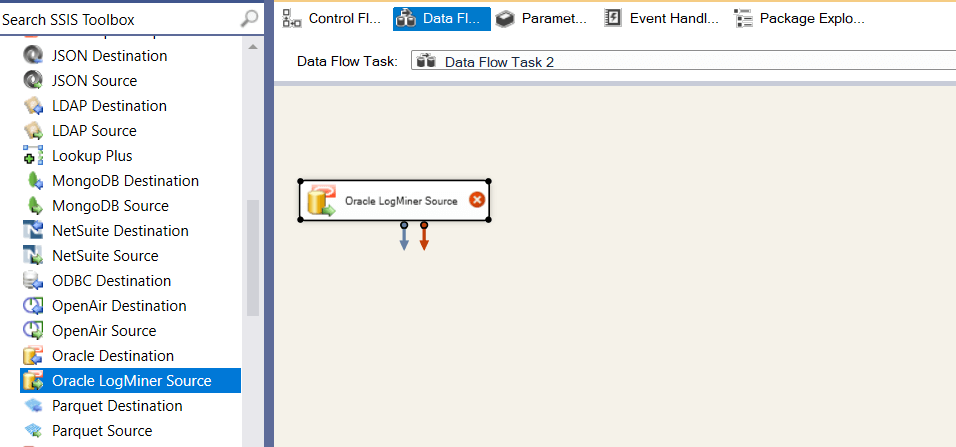
- In the SSIS Toolbox, locate the COZYROC's Oracle LogMiner Source component and drag it onto the Data Flow canvas.
- Double-click on the component on the canvas.
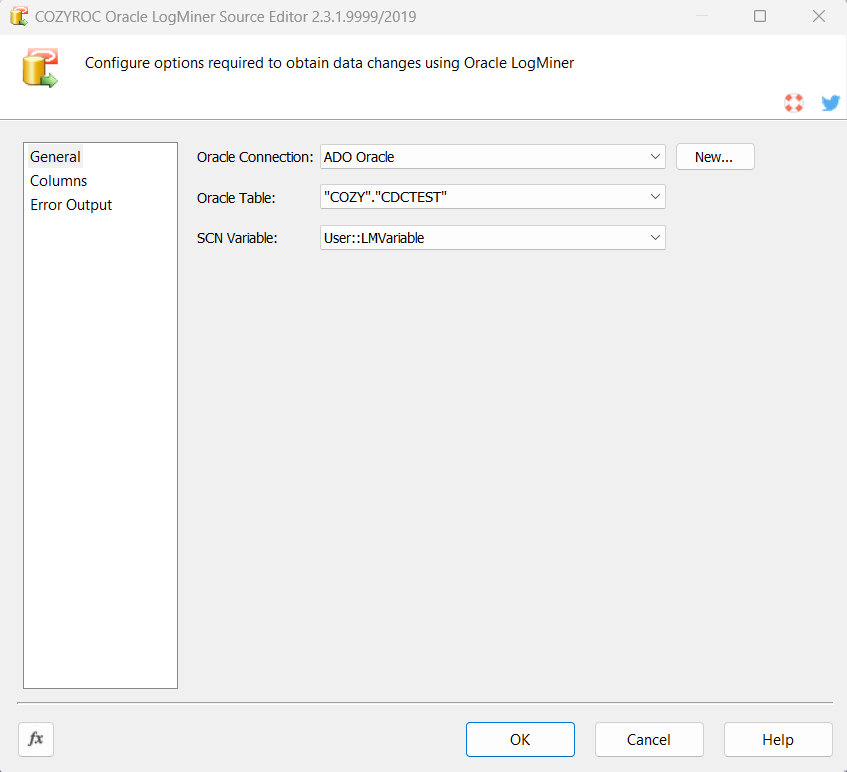
- Once the component editor opens, select an existing Oracle Connection or create a new one.
- Once the connection is selected Oracle Table list will get populated. Select Oracle Table.
- Select SCN Variable that holds the start SCN and after execution will hold the end SCN.
- Click OK to close the component editor. The component provides three outputs for insert, update and delete operations that can be attached to downstream components.
Congratulations! You have successfully configured the Oracle LogMiner Source component.
Parameters
Configuration
Select an existing ODP.NET Oracle connection manager, or click button New... to create a new connection manager.
Select the Oracle Table that contains the captured changes that you want read.
Select the variable containing the start SCN and after execution will hold the end SCN.
Knowledge Base
What's New
- New: Introduced component.
Related documentation


COZYROC SSIS+ Components Suite is free for testing in your development environment.
A licensed version can be deployed on-premises, on Azure-SSIS IR and on COZYROC Cloud.