
Overview

The CDC Task Plus is an SSIS Control Flow Task designed to manage and coordinate the processing of change data within an SSIS package. It provides the logic required to identify and maintain the range of changes that need to be extracted from CDC-enabled sources.
The task interacts with a CDC-enabled data source to track changes such as inserts, updates, and deletes, and manages state information that determines which changes have already been processed. By maintaining and updating this state, the CDC Task Plus ensures that downstream data flows receive only the relevant changes for each execution, supporting incremental data loading and synchronization scenarios.
The CDC Task Plus works in conjunction with a CDC Source Plus component within the Data Flow to retrieve the captured data changes. It can initialize, reset, or advance the CDC processing range based on configured modes, making it suitable for both initial load and ongoing change processing workflows. Using this task helps streamline incremental ETL operations by providing reliable change tracking and reducing the need for manual change detection logic within the package.
The CDC Task Plus supports the following operations that handle the synchronization of initial load and change processing:
| Operation | Description |
|---|---|
| MarkInitialLoadStart | This operation is used at the start of an initial data load to capture the current Log Sequence Number (LSN) from the SQL Server source database. Recording this LSN establishes the starting point for subsequent change data capture operations and ensures that no data modifications made during the initial load are missed in later CDC processing. When using "MarkInitialLoadStart", the connection must be made with a SQL Server login that has db_owner or sysadmin privileges, since the operation retrieves the maximum LSN using the sys.fn_cdc_get_max_lsn system function. This operation is supported only for Microsoft SQL Server. |
| MarkInitialLoadEnd | This operation is used at the completion of an initial data load to capture the current Log Sequence Number (LSN) from the SQL Server source database. It marks the endpoint of the initial load phase, defining the boundary between the preloaded data and subsequent change capture processing. The LSN is determined by recording the system time at the moment this operation executes, then querying the cdc.lsn_time_mapping table to locate the first LSN that occurred after that time. When using "MarkInitialLoadEnd", the SQL Server connection must be established with a user account that has db_owner or sysadmin permissions. This operation is supported only for Microsoft SQL Server. |
| MarkCdcStart | This operation is used when the initial data load originates from a snapshot database. In such scenarios, change data capture should begin immediately after the snapshot’s Log Sequence Number (LSN) or equivalent replication position to ensure that all subsequent modifications are included in CDC processing. You can either specify the name of the snapshot database, allowing the CDC Task Plus to automatically retrieve the corresponding snapshot LSN from SQL Server, or manually provide the LSN value to use as the starting point for change tracking (SQL Server). When using MarkCdcStart with Microsoft SQL Server, the connection must be configured with a user account that has db_owner or sysadmin privileges in order to retrieve the snapshot LSN. For PostgreSQL, the operation uses the snapshot’s replication position (LSN) and requires appropriate replication privileges on the source database. |
| GetProcessingRange | This operation is executed before running the Data Flow that contains the CDC Source Plus component. It determines the range of Log Sequence Numbers (LSNs) that define which changes should be extracted during the upcoming CDC data flow execution. The calculated range is stored in an SSIS package variable, which the CDC Source Plus component uses to read and process the corresponding change data during execution. |
| MarkProcessedRange | This operation is executed after a CDC data flow run completes successfully. It records the last Log Sequence Number (LSN) that was fully processed during that run. By storing this position, the task ensures that the next time "GetProcessingRange" is executed, it begins reading changes from the correct starting LSN — immediately after the last processed range. |
Quick Start
In this section we will show you how to set up a CDC Task Plus component
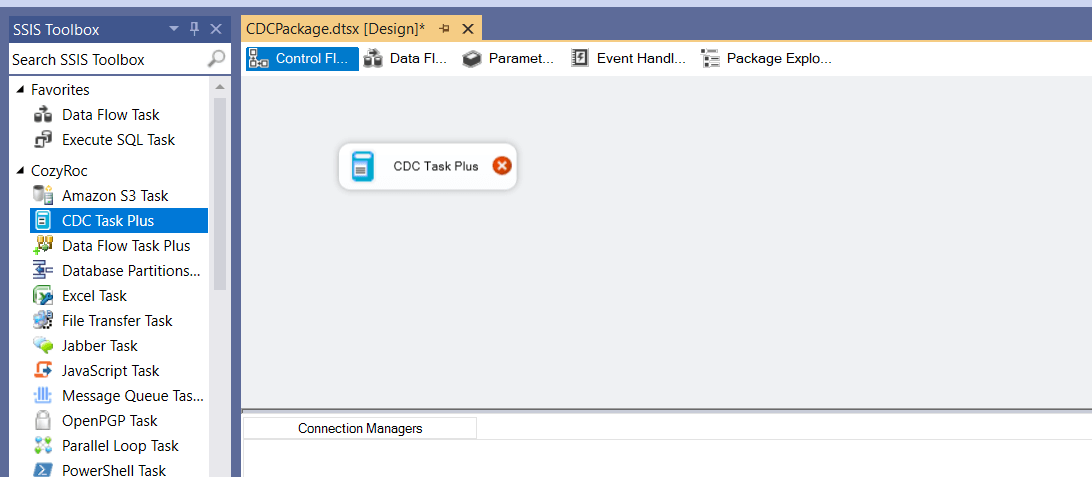
- Drag the CDC Task Plus from the SSIS Toolbox to the Control Flow canvas.
- Double-click on the task on the canvas to open the task editor.
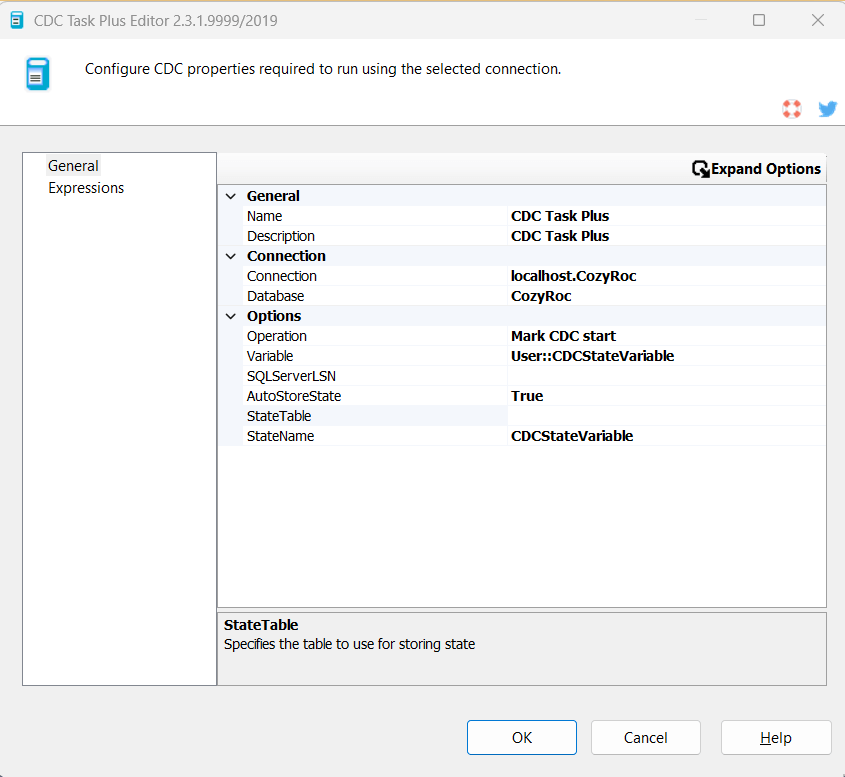
- Once the task editor opens, select an existing ADO.NET SQL Server connection or create a new one.
- Choose Database. It's default value is the connection initial catalog.
- Choose Operation to run for this task.
- Specify CDC state variable or create a new one. Once the variable is selected StateName gets automatically populated.
- Select AutoStoreState. It's default value is True. If False, StateTable and StateName cannot be specified.
- Select StateTable or create a new one.
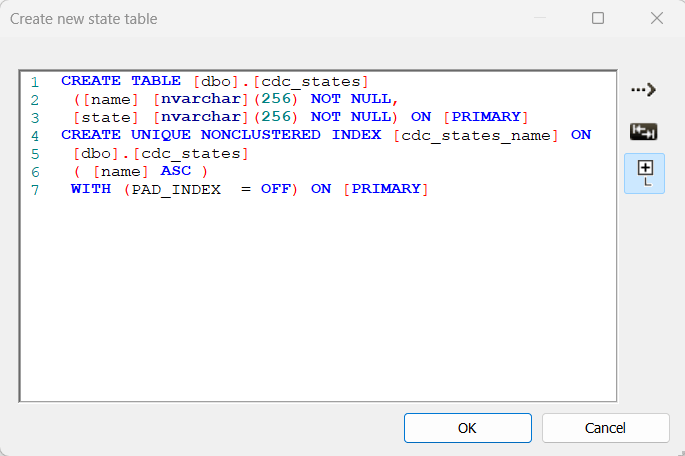
- If you want to create a new state table, the task editor provides the functionality to do so. A direct SQL query with table creation statement can be run and the state table will be created.
- Click OK to close the task editor.
In this section we will show you how to set up a CDC Task Plus component
- Drag the CDC Task Plus from the SSIS Toolbox to the Control Flow canvas.
- Double-click on the task on the canvas to open the task editor.

- Once the task editor opens, select an existing ADO.NET PostgreSQL connection or create a new one.
- Database value is the connection initial catalog.
- Choose Operation to run for this task.
- Specify CDC state variable or create a new one. Once the variable is selected StateName gets automatically populated.
- Select AutoStoreState. It's default value is True. If False, StateTable and StateName cannot be specified.
- Select StateTable or create a new one.

- If you want to create a new state table, the task editor provides the functionality to do so. A direct SQL query with table creation statement can be run and the state table will be created.

- Click OK to close the task editor.
Parameters
General
Use the General page of the CDC Task Plus Editor dialog to configure task common information parameters.
Specify the task name.
Specify the task description.
Connection
Use the Connection page of the CDC Task Plus Editor dialog to configure the parameters needed to communicate with a database server.
Selects an existing ADO.NET SQL Server or PostgreSQL connection manager, or click <New connection...> to create a new connection manager.
Selects an existing database. The default value is the initial catalog of the selected connection manager.
Selects the type of the connection. The possible connection types are ADO.NET and PostgreSQL connections.
Options
Use the Options page of the CDC Task Plus Editor dialog to configure the change data capture options .
Specifies the operation to run for this task. The available values are: Mark initial load start (SQL Server only), Mark initial load end (SQL Server only), Mark CDC start, Get processing range and Mark processed range.
Specifies a SSIS package variable that stores the state information for the task operation.
Specifies SQL Server LSN to start the CDC or Snapshot database name. Leave empty for current LSN. SQL Server only.
Specifies whether to automatically handle loading and storing the CDC state in a state table. The default value is True. If False, StateTable and StateName cannot be specified.
Specifies the database table to use for storing state.
Specifies a name to associate with the persistent CDC state.
Knowledge Base
What's New
- Introduced task with SQL Server support.
- New: PostgreSQL support.
- New: PostgreSQL Connection Manager support.
Related documentation


COZYROC SSIS+ Components Suite is free for testing in your development environment.
A licensed version can be deployed on-premises, on Azure-SSIS IR and on COZYROC Cloud.