
Overview

The CDC Source Plus is an SSIS Data Flow Component that retrieves incremental changes from SQL Server and PostgreSQL tables enabled for change data capture. It reads from the CDC change tables within a specific Log Sequence Number (LSN) range provided by the CDC Task Plus, delivering only the data modifications that occurred in that range. The component can provide separate outputs for insert, update, and delete operations, or a single combined output containing all captured change operations, enabling efficient incremental data movement and synchronization. Depending on configuration, it can produce either all captured changes or net changes (SQL Server), simplifying downstream transformation and loading processes.
By default, CDC Source Plus creates separate outputs for insert, update, and delete operations. Enable Use single output to combine all captured operations into one output. This can simplify data flows where all change types are processed by the same downstream component.
By integrating with the CDC Task Plus, the CDC Source Plus provides a reliable, automated mechanism for change tracking without requiring custom queries or manual change detection logic.
Microsoft SQL Server Change Processing
The CDC Source Plus supports the following processing modes for handling captured changes when using Microsoft SQL Server sources:
| Processing mode | Description |
|---|---|
| All | Outputs every change captured within the current CDC range, excluding any before-update values. This mode provides a straightforward stream of inserts, updates, and deletes as they were recorded. |
| All with old values | Outputs all captured changes along with their previous values. For each update operation, two records are generated — one representing the state before the update and another representing the state after the update. This mode allows comparison or auditing of changes at the column level. |
| Net | Produces a consolidated view of changes, returning a single change row per source record modified in the current CDC interval. If a row was updated multiple times, only the final outcome is emitted — for example, an insert followed by update is treated as a single update, and an update followed by delete becomes a delete. |
| Net with update mask | Similar to the Net mode, but includes additional Boolean columns named using the pattern __$ |
| Net with merge | A variation of Net mode where insert and update operations are combined into a single Merge (or Upsert) operation. This simplifies downstream logic by handling both new and modified rows through a unified output stream. |
Note: The Net processing modes for SQL Server require net changes to be enabled for the CDC instance on the source table.
The database and table must be CDC enabled.
PostgreSQL Change Processing
When using a PostgreSQL source via an ADO.NET or PostgreSQL connection, CDC Source Plus uses PostgreSQL logical replication to capture and process changes. PostgreSQL does not expose multiple CDC processing modes based on LSN manipulation or CDC metadata tables. Instead, change processing is driven by a replication slot and a single, continuous change stream starting from a specified replication LSN. Initial load coordination and restart behavior for PostgreSQL are controlled by the replication LSN rather than CDC processing modes.
CDC Source Plus processes changes using a unified replication-based model that:
-> Reads changes from a logical replication slot
-> Starts from a CDC Task generated or previously recorded replication LSN
-> Continuously streams INSERT, UPDATE, and DELETE operations
-> Guarantees ordering and consistency as provided by PostgreSQL WAL
To enable change data capture from PostgreSQL, the source database must be configured to support logical replication. The following prerequisites must be satisfied before using CDC Source with a PostgreSQL ADO.NET or PostgreSQL connection. Logical replication must be enabled in the PostgreSQL server configuration file (postgresql.conf). After modifying postgresql.conf, restart the PostgreSQL service for the changes to take effect.
The following settings are required:
| wal_level = logical | Enables logical decoding of WAL (Write-Ahead Log) records, which is required to capture row-level changes. |
| max_replication_slots | Specifies the maximum number of replication slots that can be created. At least one slot is required for CDC Source Plus. |
| max_wal_senders | Specifies the maximum number of concurrent replication connections. At least one WAL sender is required. |
Logical Replication Publication:
A publication defines which tables’ changes are exposed to logical replication consumers. A publication must exist for the tables that CDC Source Plus needs to track. Only tables included in the publication will produce CDC events. Schema changes are not replicated; only row-level INSERT, UPDATE, and DELETE operations are captured. Adding tables to a publication affects only future changes.
SQL command for publication creation: CREATE PUBLICATION cdc_publication FOR TABLE public.orders
Logical Replication Slot:
CDC Source Plus for PostgreSQL uses a logical replication slot to read changes from PostgreSQL. The replication slot must be created using a supported logical decoding pgoutput plugin.
SQL command for slot creation: SELECT * FROM pg_create_logical_replication_slot('cdc_slot_orders', 'pgoutput')
CDC Source Plus starts reading changes from a specified PostgreSQL replication LSN generated by CDC Task via Mark CDC Start. PostgreSQL does not use CDC metadata tables; all change tracking is driven directly from WAL records.
When using PostgreSQL logical replication, the ADO.NET connection manager must have Persist Security Info set to True, as the CDC Source Plus requires access to the connection credentials for establishing and maintaining the logical replication session.
_
Quick Start
In this section we will show you how to set up an CDC Source Plus component.
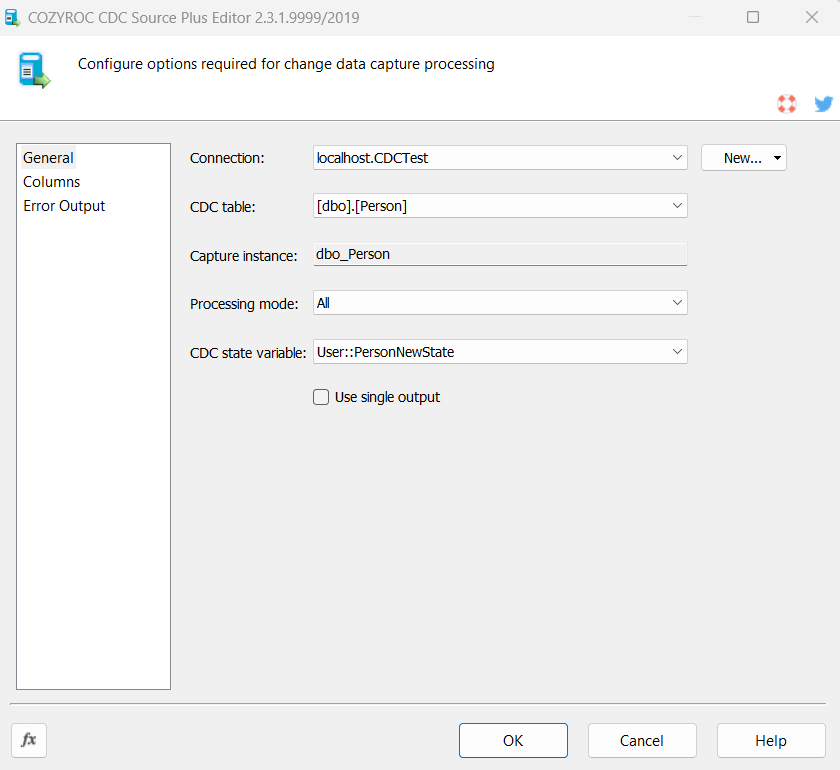
- In the SSIS Toolbox, locate the COZYROC's CDC Source Plus component and drag it onto the Data Flow canvas.
- Double-click on the component on the canvas.

- Once the component editor opens, select an existing SQL Server ADO.NET connection or create a new one.
- Once the connection is selected CDC table list will get populated with CDC enabled tables only. Select CDC table.
- The Capture instance will get automatically populated when CDC table is selected.
- Select Processing mode.
- Select CDC state variable that holds the CDC state.
- Enable Use single output when insert, update, and delete records should be combined into one output. Leave the option disabled to create separate outputs for each operation.
- Click OK to close the component editor. The component provides three outputs for insert, update and delete operations or a single combined output that can be attached to downstream components.
Congratulations! You have successfully configured the CDC Source Plus component.
In this section we will show you how to set up an CDC Source Plus component.
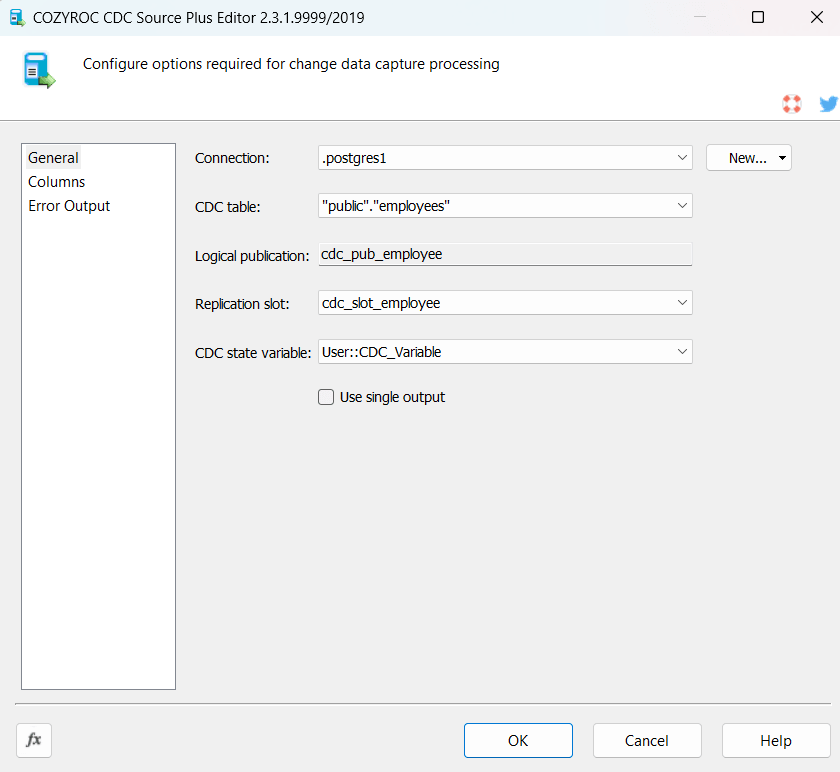
- In the SSIS Toolbox, locate the COZYROC's CDC Source Plus component and drag it onto the Data Flow canvas.
- Double-click on the component on the canvas.

- Once the component editor opens, select an existing PostgreSQL ADO.NET connection or create a new one.
- Once the connection is selected CDC table list will get populated with available tables. Select the table you want to track changes on. If the table is not configured for logical replication, an error message will occur.
- When the table is selected Logical publication will be automatically filled.
- Select Replication slot.
- Select CDC state variable that holds the CDC state.
- Enable Use single output when insert, update, and delete records should be combined into one output. Leave the option disabled to create separate outputs for each operation.
- Click OK to close the component editor. The component provides three outputs for insert, update and delete operations or a single combined output that can be attached to downstream components.
Congratulations! You have successfully configured the CDC Source Plus component.
Parameters
Configuration
Selects an existing ADO.NET SQL Server or PostgreSQL connection manager, or click button New... to create a new connection manager. The connection database must be CDC enabled.
Select the CDC source table that contains the captured changes that you want read.
Specifies CDC capture instance with the CDC table to be read. It is populated automatically once the CDC table is selected.
Select the processing mode for your needs. The available options are All, AllWithOldValues, Net, NetWithUpdateMask and NetWithMerge. Note that the net processing modes require net changes to be enabled for the CDC instance on the source table.
Select the variable containing the CDC state.
Specifies the PostgreSQL logical publication that defines which tables are included for change data capture.
Specifies the PostgreSQL logical replication slot used to stream WAL changes from the source database.
Specifies whether insert, update, and delete records are exposed through one combined output or through separate outputs. When enabled, the component creates one output containing all captured change operations. When disabled, the component creates separate outputs for insert, update, and delete operations. The default value is False.
Knowledge Base
What's New
- New: Introduced component with SQL Server.
- New: PostgreSQL support.
- New: PostgreSQL Connection Manager support.
- New: Added the Use single output option to combine insert, update, and delete records into one output.
Related documentation


COZYROC SSIS+ Components Suite is free for testing in your development environment.
A licensed version can be deployed on-premises, on Azure-SSIS IR and on COZYROC Cloud.