
Overview

REST Connection Manager is an SSIS Connection Manager for establishing REST connections. Use the API to build components based on the REST Connection Manager. The REST Connection Manager depends on configuration which describes the application service (REST/OData/OpenAPI/GraphQL/SOAP) in use. A configuration is a combination of XML static definitions and full ECMAScript JavaScript code. The combination of XML and custom code can solve any connectivity requirement, both simple and complex. The proof is more than 150 connectors we have created with that technology as of September, 2026. There is no other technology on the market, providing such capable platform for your connectivity needs.
Note: When we include a connectivity configuration for particular application, we make sure we include as much of the API as possible. We can also quickly accommodate additional requirements by simply sending you an updated configuration for you to test. We are confident COZYROC's connectors will deliver the most complete development experience for your needs.
Support for importing OpenAPI specifications was introduced in 2.0 release.
Support for importing WSDL definitions was introduced in 2.1 release.
Support for GraphQL APIs is introduced in 2.2 release.
Support for OData APIs is introduced in 2.2 release.

Demonstration
Quick Start
In this article, you will learn how to find the documentation for the REST application you want to connect to, how to get an API Key for the REST application you want to connect to, and how to ensure you are using a version of COZYROC's SSIS+ that has the ability to define a custom REST configuration.
- Look for the API documentation for the application you wish to connect to by searching for the following: “[application name] Developer API”. In this example, we searched for “Copper Developer API”.
- Go to the Authentication section of the Developer API documentation. For Copper, that is https://developer.copper.com/introduction/authentication.html .
- Follow the instructions for how to generate an API token or an API key. Both terminologies seem to be used interchangeably.

- Set up a new project in Visual Studio.
- Click on “Help” and then “About”.
- Check that your version of COZYROC SSIS+ is 1.9 or above.

In this article, you will learn how to begin the configuration of a connection manager for a custom REST application.
- Right-mouse-click in the Connection Manager section of Visual Studio.
- Click on “New Connection”.
- Scroll down in the Connection Manager Type and double-click on “REST”.

- For Configuration, select “{ custom }”.

- Click on the wrench to the right of Configuration.

- Leave “Start from scratch” selected and click “OK”.

- For Configuration Name, type “Copper”.
- Click on “0 authentications”.

- In the bottom right corner, select “None” for Create a new authentication using template.

This segment shows how to define the parameters that will be exposed to the user. In the case of Copper, they will enter their email address and API key.
- Click on “0 items” next to User Parameters.

- Click on the “New User Parameter” button in the bottom right corner.

- For Name, type in “Email”.
- Leave Type set to “regular”.
- Now you are done configuring the Email parameter; it will be known as {{=connection.user.Email}}.

- Click on “User Parameters” in the path near the top of the window to define a second variable.

- Click on the “New User Parameter” button in the bottom right corner again.
- For Name, type in “APIKey”.
- Set Type to “password” so that it is not visible when the user pastes their API key into this parameter.
- Now you are done configuring the APIKey parameter; it will be known as {{=connection.user.APIKey}}.

- Give the authentication configuration a name; in this case I called it “Auth1”.
- Click on OK; this will put the name “Auth1” in place for this authentication configuration.
- To get back where we were, click on the wrench again and then “1 authentication” and then “Auth1”.

In this segment, you will learn how to define the parameters that are sent to Copper during authentication. The user parameters defined in the previous segment (ie. Email and APIKey) will provide the values to be used in two of these parameters. The third parameter is a static parameter.
- Click on “0 items” next to Parameters.

- Click on “New Parameter” in the bottom right corner of the window.
- Go back to the Copper documentation page to get the exact names of the parameters.

- Copy and paste the name of the Email parameter into the Name field (X-PW-UserEmail) of the New Parameter editor.
- For the Value field, type in “{{=connection.user.Email}}”.
- For Type, choose “HttpHeader”.
- Now you are done configuring the Email parameter.

- Click on “Parameters” in the path near the top of the window so that you can define another parameter.

- Click on “New Parameter” in the bottom right corner of the window.
- Go back to the Copper documentation page to get the exact name of the APIKey parameter.

- Copy and paste the name of the APIKey parameter into the Name field (X-PW-AccessToken).
- For the Value field, type in “{{=connection.user.APIKey}}”.
- For Type, choose “HttpHeader”.
- You’re done configuring the APIKey parameter.

- Click on “Parameters” in the path near the top of the window so that you can define another parameter.

- Click on “New Parameter” in the bottom right corner of the window.
- Go back to the Copper documentation page to get the exact name of the static parameter.

- Copy and paste the name of the static parameter that Copper requires into the Name field (X-PW-Application) of the New Parameter editor.
- Go back to the Copper documentation page and copy the value to be used for this parameter (developer_api).
- Paste this value into the Value field of the New Parameter editor.
- For Type, choose “HttpHeader”.
- You’re done configuring the static parameter.

- Click on “Parameters” in the path near the top of the window to see the parameters that have been set up for Authentication

- At any time, you can click on the orange button in the bottom left corner to see the XML that has been generated; click “OK” to close the XML viewer.


- Click on “Auth1” in the path near the top of the window to return to the highest-level authentication definition window.

- Go back to the Copper documentation page.
- Click on “Companies” in the menu on the left to expand the sub-menu.

- Click on “List Companies” in the sub-menu on the left.

- Copy the latter part of the URL at the top of the page (everything after “v1” starting with the “/”) which is “/companies/search”.

- Back in Visual Studio, paste that part of the URL into the Test request URL field in the lower portion of the window (/companies/search).

- In the Test request portion of the window, set Method to “POST” – the use of “POST” is shown at the top of the Copper documentation page at the beginning of the URL.
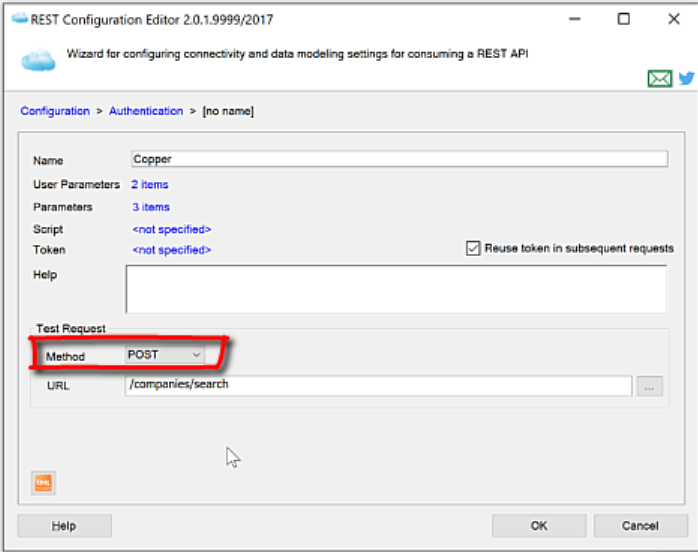
- Copy the first portion of the URL from the Copper documentation page (up through “v1”).

- Back in Visual Studio, click on “Configuration” in the path near the top of the window.

- Paste the contents of the clipboard into the Base URL field (https://api.prosperworks.com/developer_api/v1).
- Click “OK” to close the window.

- Start the Fiddler Tracing tool so you can see the traffic when you test your configuration. This article describes how to install Fiddler and how to trace traffic.
- Type the email address you used when requesting your API key into the Email field.
- Copy and paste your API key into the API Key field.

- Click on “Test Connection”.
- You should see a pop-up window that says “Test Connection Succeeded”.
- Click “OK” to close the pop-up window.

In this section you will be shown how to test that your definitions for the resources and fields are correct. We will use the REST Source component to view data from the application.
- Drag the Data Flow Task onto the control flow canvas.
- Go to the Data Flow canvas and drag COZYROC’s REST Source component onto the canvas.
- Rename the connection manager to “Copper”.

- Open the component editor for the REST Source component.
- In the General tab, select the REST connection manager named Copper.

- For Resource, select “Lead” (this is the only resource that has been set up); you would need to go through the resource definition for each resource you want to access.

- Click on the preview tab and you should see the leads from your Copper service.

Parameters
Server
Use the Server page of the REST Connection Manager dialog to specify properties for connecting to the REST service.
- Test Connection
- Confirm the connection manager configuration by clicking Test Connection.
Select the REST service to use.
If you want to see support for other services, please contact us to discuss this.The default location of the configurations listed is "C:\Program Files (x86)\CozyRoc\SSIS\REST" folder. The configurations are defined in XML file and we encourage our customers to use them as reference.In 1.9 release, there is also a{ Custom }item in the list of REST configurations that enables authoring a custom, embedded configuration via the REST Configuration Editor.Specify the name or IP address of the REST service.
For REST service authorized by a token, you must specify the connection token. The token storage can be file or SQL Server database 2.1. For SQL Server only an ADO.NET connection is supported. An existing token can be selected from a file or a database storage. If a token doesn't exist, you must create a New... token.
The type of storage is specified with Token storage parameter.
Token file parameter displays the selected token file. Allows selection of an existing file and creation of a new token. It is visible only when Token storage is File.
Token parameter displays the selected database host name/IP and token id. Allows selection of an existing token from database and creation of a new token. It is visible only when Token storage is Database.
Password specifies the token decryption password.
As of version 2.1 the property
TokenFileis replaced withTokenStoreproperty. The new property contains either a token file name or a database connection string depending on the storage type.Each REST service has specific parameters for establishing successful connections. Press the
 icon to get more information about the connection parameters.
The parameters are stored in a single property
UserConfiguration. For more information, see hereSpecify the number of seconds before timing out the session connection. The default value of this property is 100 seconds.
Specify if all clients should use the same connection. This property has the options listed in the following table.
Value Description True All clients use the same connection (default). False Every client uses a different connection.
Advanced
Use the Advanced page of the REST Connection Manager dialog to specify additional properties for logging, service requests throttling and optional error retry.
Specify the verbose log file name for investigating REST connection issues.
Specify the number of web services requests per second. The default is 5 requests/second.
Specify the maximum request retry number.
Specify the number of seconds to pause between retries. The default is 30 seconds.
Optional. Specify to retry only if the error message matches the RegEx pattern.
Specify to ignore server certificate errors. This property has the options listed in the following table.
Value Description True Ignore server certificate errors. False Server certificate errors are not ignored (default).
Proxy
Use the Proxy page of the REST Connection Manager dialog to specify properties if your server is behind firewall.
Specify the name or IP address of the proxy server. If not specified, a proxy server is not used.
Specify the port number on the proxy server to use for the connection.
Specify the user name to access the proxy server.
Specify the password to access the proxy server.
Client Certificate
Use the Client Certificate page of the REST Connection Manager dialog to specify client certificate for mutual TLS authentication.
Specify the client certificate location - file system, current user certificate storage or local system certificate storage.
Specify the certificate file. Only .pfx certificates are accepted. A file can be selected by using the ... button.
Specify the password to decrypt the certificate file.
Specify the name of the X.509 certificate store.
Specify text to filter the results in the certificate selection UI.
Specify the certificate thumbprint. An installed certificate can be selected by using the ... button.
Knowledge Base
- The value is too large to fit in the column data area of the buffer.
- Why the buttons on the REST Connection manager are missing?
- How to use Postman Collections in COZYROC SSIS+ REST framework?
- I see a response returned from the web service, but the preview in REST Source does not show any data.
- What is an experimental REST configuration and where can I find the documentation for the experimental REST configurations?
Related scripts
What's New

COZYROC SSIS+ Components Suite is free for testing in your development environment.
A licensed version can be deployed on-premises, on Azure-SSIS IR and on COZYROC Cloud.