Overview
Several COZYROC SSIS+ components (currently JSON, Parquet and Avro sources and destinations) support metadata initialization by specifying a schema in a custom JSON format. The component's schema describes their inputs/outputs and the corresponding columns. Enabling the user to specify the schema in such a way is especially useful when the component's metadata cannot be initialized automatically (e.g. from a provided sample file).
Each element of the schema is represented by two mandatory attributes: name, type and few optional: length, precision, scale, fields and list. The type represents an SSIS data type, for example DT_I8. It can be missing from the schema together with length when they have their default values at the same time: type is DT_WSTR and length is 250. The schema supports two complex types such as: list means collection (which can consist of nested objects) and nested object, which contains fields.
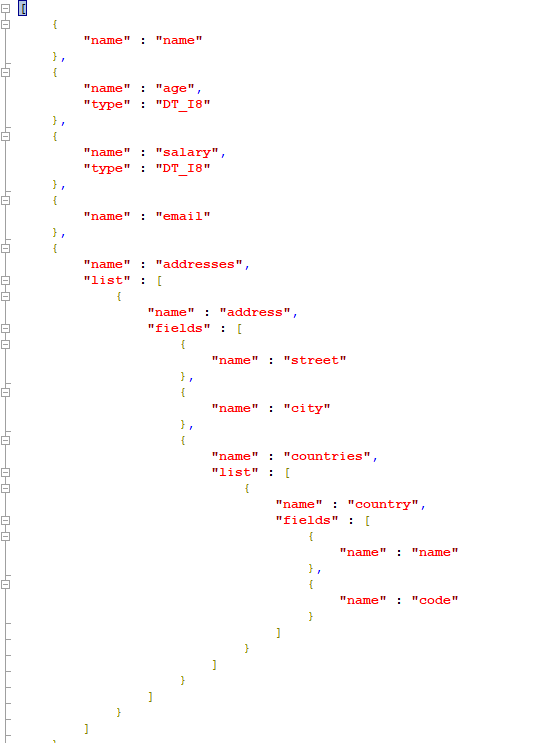
For example, а file containing a list of objects composed of name, age, salary, email properties and a list of objects containing properties: street, city and country(nested object) with name and code properties can be pictured as:

and can be presented with a schema string like this:
Schema copying and pasting
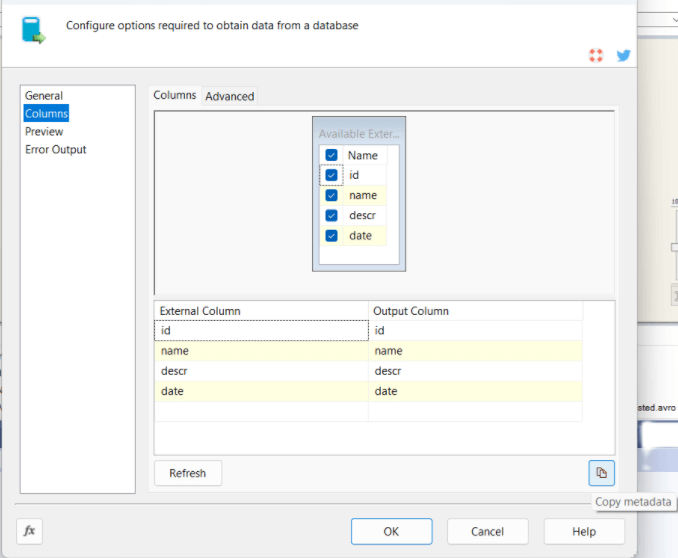
If you want to mirror the metadata of some COZYROC SSIS+ component in a component that supports specifying a schema (including multiple inputs/outputs), you can do it by going to the source component page and in Columns tab to click button Copy metadata. The schema's JSON will be copied in the clipboard, so later you can paste it in the corresponding component's editor.