
Overview

The Lookup Plus Component is an SSIS Data Flow Component providing enhanced functionality as compared to the standard SSIS Lookup component. To simplify your data flows, the component allows multiple lookup definitions in the same dialog and definition of values when the input cannot be matched or when it is undefined. In addition the Lookup Plus component supports a variety of connection types as a source, making it quite versatile.

Demonstration
Quick Start
by Fernando Sanchez on October 12, 2018
In this Quick Start article, we will show you step by step in How-To create a simple package that performs a lookup and set an active flag using the COZYROC’S Lookup Plus component and Derived Column Transformation to create a new column value. We will use the OLE DB Source component in the Data Flow to read the data from a local AdventureWorks2016CTP3 database and write it to a different table in another database using the OLE DB Destination component.
Requirements
In order to complete this task you must have Microsoft SQL Server 2017 Enterprise Edition or Developer Edition, and your computer must have the following minimum requirements:
Operating Systems
- Windows 10 version 1507 or higher: Home, Professional, Education, and Enterprise (LTSC and S are not supported)
- Windows Server 2016: Standard and Datacenter
- Windows 8.1 (with Update 2919355): Core, Professional, and Enterprise
- Windows Server 2012 R2 (with Update 2919355): Essentials, Standard, Datacenter
- Windows 7 SP1 (with latest Windows Updates): Home Premium, Professional, Enterprise, Ultimate
Hardware
- 1.8 GHz or faster processor. Dual-core or better recommended
- 2 GB of RAM; 4 GB of RAM recommended (2.5 GB minimum if running on a virtual machine)
- Hard disk space: up to 130 GB of available space, depending on features installed; typical installations require 20-50 GB of free space.
- Hard disk speed: to improve performance, install Windows and Visual Studio on a solid state drive (SSD).
- Video card that supports a minimum display resolution of 720p (1280 by 720); Visual Studio will work best at a resolution of WXGA (1366 by 768) or higher.
Create Source and Destination Connections
Before we can begin to setup the source and destination components, we will need to create two Connection Managers. Since our source and target is a SQL Server database, we will use OLE DB Connection for both Connection Managers.
- Right-Click in the Connection Manager and Select New OLE DB Connection from the pop-up menu option.
- When the Configure OLE DB Connection Manager dialog appears, Click the New button.
- Once the Connection Manager dialog appears, Type or Select the Server Name.

- Then, Select the Database Name and Test Connection.
- Click the Ok button to create the Source Connection.
- Repeat steps 2 through 5 for the Destination Connection.
- After the Source and Destination Connections have been created, rename them to SQLSourceConn and SQLTargetConn.

Setup Data Flow – OLE DB Source Component
- Drag and drop the Data Flow Task Plus from the SSIS Toolbox to the design surface (See Figure-03).

- Click the Data Flow tab.
- Add the OLE DB Source component from the SSIS Toolbox, by dragging the component to the design surface (See Figure-04).

- Double-Click on the OLE DB Source to open the Editor.
- Click the Connection Manager
- From the OLE DB connection manager list, Select the SQLSourceConn that we created earlier.
- Select SQL command for the Data access mode.
-
Enter the following SQL Statement in the SQL command text box (See Figure-05).
SELECT * FROM SALES.CUSTOMER -
Click the OK button.

Setup Data Flow – Lookup Plus Component
- Add the Lookup Plus Component from the SSIS Toolbox, by dragging the component to the design surface.
- Drag the connector arrow from OLE DB Source to the Lookup Plus Transformation (See Figure-06).
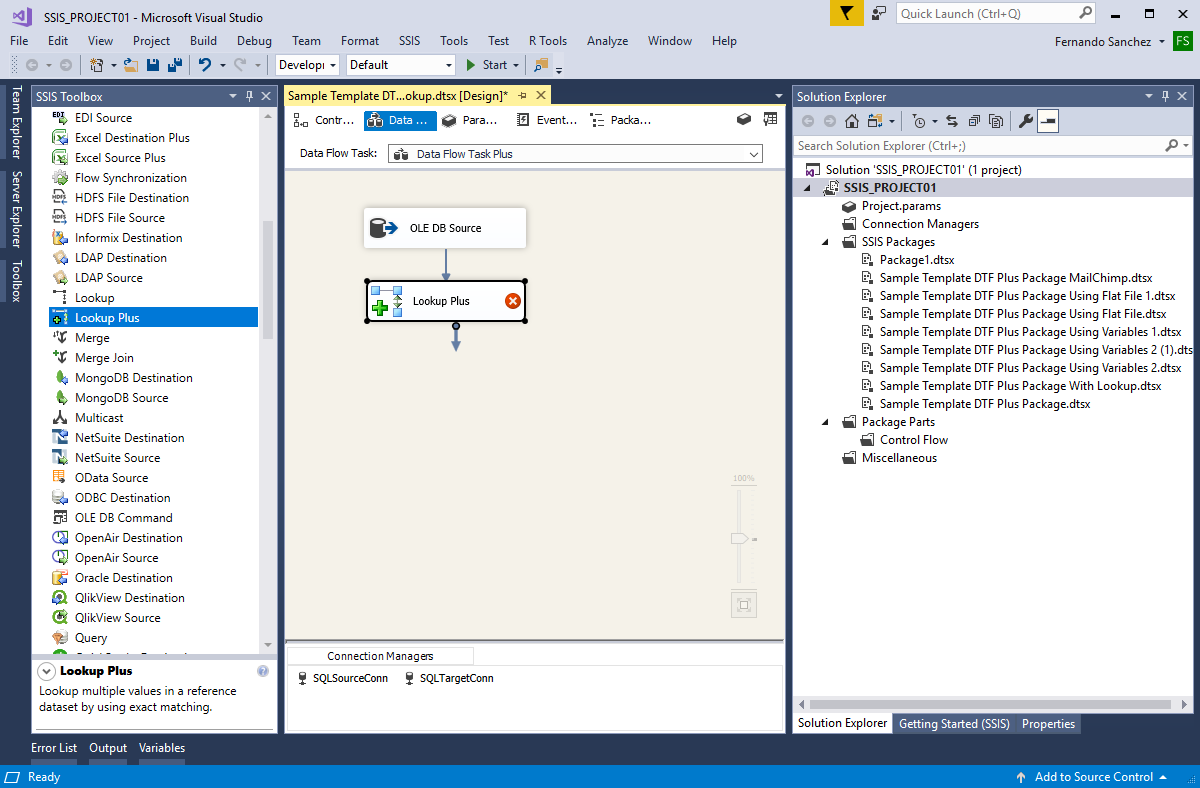
- Double-Click on the Lookup Plus to open the Editor.
- Select CustomerID from the drop-down box for the Input Column option (See Figure-07).

- In the Reference Column, click the ellipsis button to open the Reference Setup dialog.
- Select SQLSourceConn from the drop-down box for the Connection option.
-
Set the SQL Query option and type the following query in the text box:
SELECT T1.CustomerID ,DATEDIFF(dd, T1.[OrderDate], T2.MaxOrderDate) NunmberOfDays FROM [Sales].[SalesOrderHeader] T1 ,(SELECT MAX([OrderDate]) MaxOrderDate FROM [Sales].[SalesOrderHeader]) T2 ,(SELECT CustomerID, MAX([SalesOrderID]) MaxOrderID FROM [Sales].[SalesOrderHeader] GROUP BY CustomerID) T3 WHERE T1.CustomerID = T3.CustomerID AND T1.[SalesOrderID] = T3.MaxOrderID -
Click the Green Check Box .
- Select CustomerID from the drop-down box for the Key Column option.
- Select NumberOfDays from the drop-down box for the Value Column option (See Figure-08).
- Click the OK button to return.

- Enter the value 91 for the On NULL and No Match property.
- Click the OK button to return to the Data Flow.
Note: The SQL query calculates the number of days since an order was placed. If the input is undefined, it returns the value from the On NULL property and if the input doesn’t produce a match, it returns the value from No Match property (See Figure-09).

Setup Data Flow – Derived Column Component
- Add the Derived Column Component from the SSIS Toolbox, by dragging the component to the design surface.
- Drag the connector arrow from Lookup Plus to the Derived Column Transformation (See Figure-10).

- Double-Click on the Derived Column Transformation to open the Editor (See Figure-11).
- Type ActiveFlag for the Derived Column Name.
- Expand the Column folder and drag the CustomerID to the Expression box.
-
Type the remaining formula in the Expression box:
[NunmberOfDays] >= 90 ? 0 : 1 -
Click the OK button.

Setup Data Flow – OLE DB Destination Component
- Add the OLE DB Destination Component from the SSIS Toolbox, by dragging the component to the design surface.
- Drag the connector arrow from Derived Column to the OLE DB Destination Component (See Figure-12).

- Double-Click on the OLE DB Destination to open the Editor.
- Select SQLTargetConn from the drop-down box for the OLE DB connection manager option.
- Select Table or view – fast load for the Data access mode.
- Select [dbo].[Src_Customer] from the drop-down box for the Name of the table or the view option (See Figure-13).

- Click on the Mappings page to map input columns to the destination columns.
Note: The Input Columns and Destination Column should automatically be mapped (See Figure-14).
- Click the OK button to return to the Data Flow.

- Click File from Menu and Save All.
- To run the package, Click Start Debugging on the menu bar, or press F5 key (See Figure-15).
Note: After the package finishes running, press Shift+F5 to return to design mode.

Summary
In this Quick Start article, I have shown you How-To create an SSIS package that performs a lookup using COZYROC’S Lookup Plus component to return a calculated value from a custom SQL query. Then how to use the returned value in an expression within the Derived Column Transformation, which is a standard component of SSIS, to create and set the value of the new column prior to loading the OLE DB Destination table.

Parameters
Main
Use the Main dialog parameters below to configure the Lookup Plus component for processing.
Specify the component name.
Specify the component description.
Lookup definition
The lookup definitions are set up in the lookup definition grid.

- Refresh
- Use the refresh command to update the lookup definitions with the latest metadata.
Select input column for lookup key.
Set up lookup reference.
Related Topics: Reference Setup
Specify the lookup result output column name.
Specify the output value when the input is undefined. Insert white space to return NULL result. You can reference input column by specifying column name in square brackets like this: [column]
Specify the output value when the input doesn't produce a match. Insert white space to return NULL result. You can reference input column by specifying column name in square brackets like this: [column]
Knowledge Base
- Where can I find the documentation for the Lookup Plus?
- Error message: Retrieving the COM class factory with component with CLSID failed due to the following error: 80040154 Class not registered
- Error Message: Columns cannot convert between unicode and non-unicode string datatype
- Match multiple columns with Lookup Plus
- SQL 2012 compatibility and Upgrade
Related scripts
What's New
- New: PostgreSQL Connection Manager support.
- New: Basic clipboard cut/copy/paste operations for use in lookups definition grid.
- Fixed: Failure when the output column for a specific input column was renamed in the Advanced editor (Thank you, Dave).
- Fixed: Failure with an incomprehensible error when the input column(s) referenced in the On NULL and No Match definitions are not found (Thank you, John).
- Fixed: Failed with error "Column data type DT_STR is not supported by the PipelineBuffer class" when trying to process input columns of type DT_STR (Thank you, Megha).
- New: Ability to specify special characters in On NULL and No Match definitions.
- New: Ability to reference input columns in On NULL and No Match definitions.
- Fixed: Failed to find item if input column and lookup key column types didn't match.
- Fixed: Dialog was cancelled even when user has explicitly set not to cancel.
- New: Component now uses multi-threaded lookups loading.
- New: Component now supports SQL statement from variable.
- New: Component now supports binary array as key.
- New: Component now supports SSIS expressions in the query statement.
- New: Introduced component.
Related documentation


COZYROC SSIS+ Components Suite is free for testing in your development environment.
A licensed version can be deployed on-premises, on Azure-SSIS IR and on COZYROC Cloud.